 SwatchKit
Swatches that stay right at 5,000 variations.
Colour, image and size swatches for WooCommerce. Built on WooCommerce's own attribute data, under 4 KB, no jQuery — and still correct long after other swatch plugins give up at 30 variations.
- Free forever — no variation limits
- WooCommerce 8.0+ · HPOS compatible
- No tracking, no outbound requests
Trail Runner
$119Loading the picker…
The same availability logic as the plugin, in your browser. 1,200 variations — try White, then look at the big sizes.
Most swatch plugins stop being right at 30 variations.
WooCommerce stops sending variation data to the page once a product passes 30 variations. Swatch plugins that rely on it can no longer tell which combinations are out of stock — so shoppers pick sizes that don't exist, and find out at “Add to cart”.
Typical swatch plugin 1,200 variations
Every size looks available. Pick White and it still offers EU 44–45.
SwatchKit 1,200 variations
Sizes that don't exist grey out; sold-out ones cross out.
Colour, image and size. All free.
Colour
A hex per term — or leave it empty and SwatchKit reads “Navy” as navy, from a built-in table of 300+ names. Two to four colours per swatch for stripes and two-tones New in 1.1.
Image
Patterns, fabrics, finishes — straight from your Media Library. Image tooltips and hover zoom included. Or let variation images become the swatches, with no setup.
Size & label
The type WooCommerce core doesn't ship. Every dropdown becomes buttons the moment you activate — zero setup.
Free. Not “free up to”.
The features other swatch plugins sell are in the free plugin, with no variation limits and nothing locked.
Unlimited out-of-stock handling
Cross out, blur, dim or hide — at 30 variations or 3,000. Unavailable combinations get their own style.
Shop & category swatches
Swatches on product cards that preview the variation's image and carry the choice to the product page.
Tooltips
The name, the image, or both. Colours you set, positioned so they never cover the swatch.
Per-product type & shape
Circles for one product, pills for another, without touching the global settings.
Quick view & infinite scroll
New product forms are picked up automatically — quick views, “load more”, page builders. No setup.
Accessibility built in
Real radio buttons, arrow keys, and screen-reader text that says “Blue, out of stock”.
Settings you'll actually enjoy.
WooCommerce → Swatches. Grouped cards, sliders with numbers, and a live preview built from the real storefront markup.
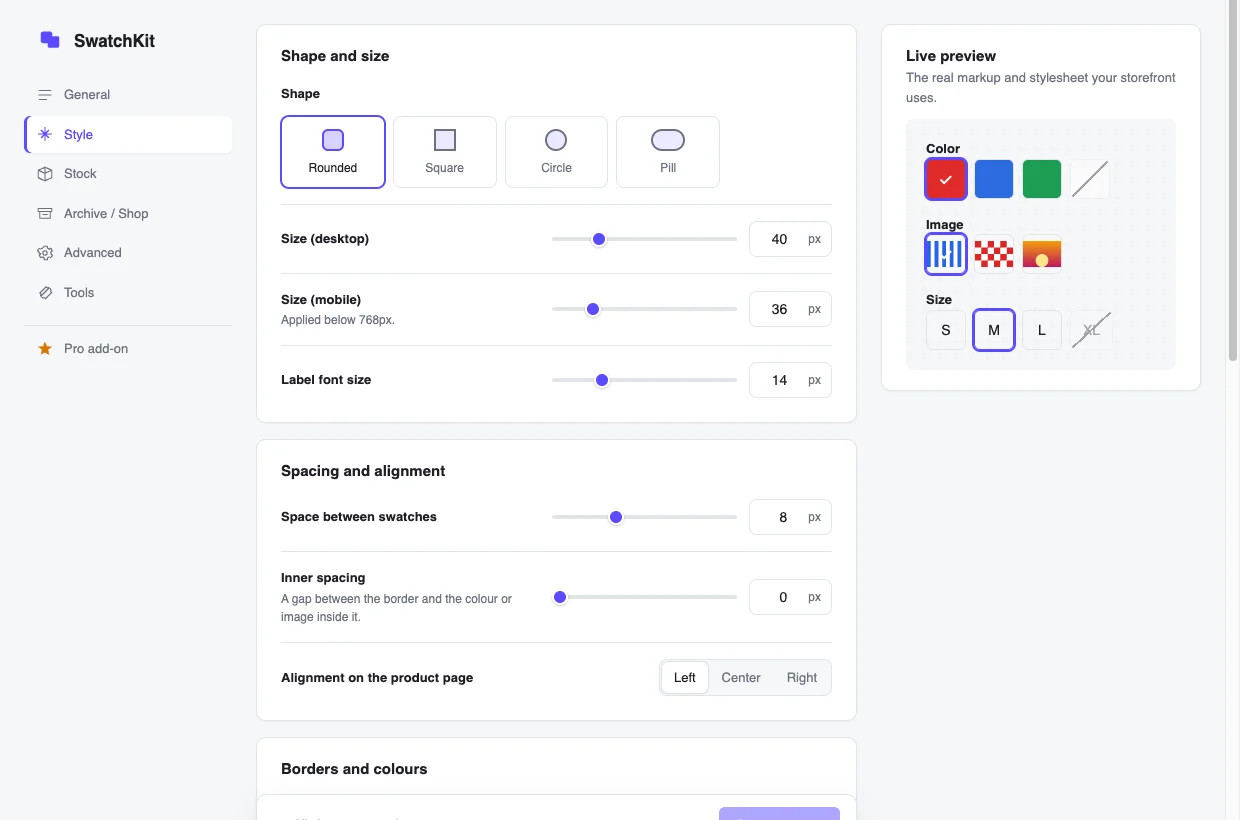
- Live preview uses your real storefront CSS
- Out-of-stock styles you can see before you pick
- Ctrl/⌘ + S to save
Core's data. Everything core doesn't do.
WooCommerce 10.9 added its own Color/Image attribute type. SwatchKit reads and writes that same data — so switching away, or back, never strands your colours and images.
WooCommerce core
- Color and image attribute type (10.9+)
- Stores colours and images on terms
- Size and label swatches
- Out-of-stock and unavailable states
- Tooltips
- Shop-page swatches
- Classic themes and big catalogs
+ SwatchKit
- Reads and writes core's colour and image data
- Size and label swatches
- Out-of-stock and unavailable states, any variation count
- Tooltips with names or images
- Shop and category page swatches
- Classic and block themes, any catalog size
Light enough to forget about.
SwatchKit frontend, gzipped
3.9 KB JS + 1.9 KB CSS — measured on every build; the build fails over 10 KB / 8 KB.
- No jQuery, no dependencies
- Loads only where swatches appear
- Zero layout shift — rendered at final size on the server
- Works with any page cache
A keyboard is enough.
Tab reaches each group once; arrow keys move between swatches like native radio buttons; Home and End jump to the ends.
“Blue, out of stock”
Screen readers hear the state, not just the colour. Swatches are real buttons with role="radio" and aria-checked.
No template overrides. Hooks for everything.
The original select stays in the page and stays the source of truth, so quick views, bundles and composite products keep working. Style with CSS variables; hook into the PHP and JavaScript.
.swk-swatches--color {
  --swk-size: 48px;
  --swk-radius: 50%;
  --swk-selected-color: #111;
}
add_filter( 'swatchkit_attribute_type', function ( $type, $taxonomy ) {
    // Keep one attribute as a dropdown.
    return 'pa_engraving' === $taxonomy ? '' : $type;
}, 10, 2 );
SwatchKit.on( 'change', ( { attribute, value } ) => {
  console.log( attribute, value ); // "pa_color" "navy"
} );
Switching is painless.
Your attributes and terms are WooCommerce data — they stay put.
- Activate SwatchKitEvery attribute becomes swatches straight away.
- Import colours and images 1.1From four popular swatch plugins, with a preview and undo.
- Check a productSet attribute types where you want something different.
- Remove the old pluginThe importer copies; it never deletes their data.
Questions
Are image swatches free?
Yes. Colour, image and size/label swatches, image tooltips, hover zoom and shop-page swatches are all in the free plugin.
Is there a variation limit?
No. Out-of-stock and unavailable handling works at any number of variations — 30, 1,200 or more.
Will it slow my store down?
No. The storefront script is under 4 KB with no dependencies, loads only where swatches appear, and makes no requests while shoppers pick options.
Does it work with my theme?
It works with any theme that uses WooCommerce's standard variation form, because it never replaces WooCommerce templates. Storefront and Astra are tested on every release; Elementor and Bricks have built-in support.
What happens if I deactivate it?
Your store goes back to WooCommerce's dropdowns. Nothing breaks and no product data is lost. Settings stay in place unless you enabled “Delete all SwatchKit data” and then delete the plugin.
When is Pro coming?
SwatchKit Pro is a separate add-on — add to cart from shop cards, low-stock markers, instant colour images and more. It's built and in testing; join the early-access list to hear first. The free plugin will never be limited to make room for it.
Put your dropdowns out of their misery.
Free on WordPress.org. No account, no credit card.